The IDE where
AI ships code
not just suggests it
An AI-native desktop IDE where your AI doesn’t just chat — it reads, writes, runs, debugs, and commits.
Three steps.
Infinite leverage.
Prompt
Describe what you want in plain language. Attach files, reference symbols, set context. Eric understands your codebase through live LSP intelligence — not guesswork.
Execute
Eric acts autonomously — reads files, runs commands, edits code, spawns agents, checks diagnostics. It works like a senior developer, not a search engine.
Review
Every file change is a diff you approve. Every shell command needs your sign-off. You stay in control of every decision — Eric does the work, you make the calls.
Quality over discount.
Your AI remembers.
Most AI tools quietly shrink your context window and aggressively compact history to cut costs. You end up with an AI that forgets what it was doing halfway through a task.
We built EricBuild differently. Eric uses the full context window every model offers, and a memory system that gradually degrades old context rather than wiping it — so your AI stays coherent across long sessions, big refactors, and multi-agent work.
You pay for quality. You get quality.
Deep intelligence across
every stack you work in.
Eric uses live Language Server Protocol for real code intelligence — not text search. Exceptional at C# and Blazor where most AI tools fall short, and fluent across every major language.
Full LSP support: go-to-definition, find references, rename, live diagnostics, code actions, inlay hints, call hierarchy — all available to the AI.
Everything you need.
Nothing you don’t.
EricBuild packs a full professional IDE, a real AI agent engine, and a cloud layer into one cohesive tool.
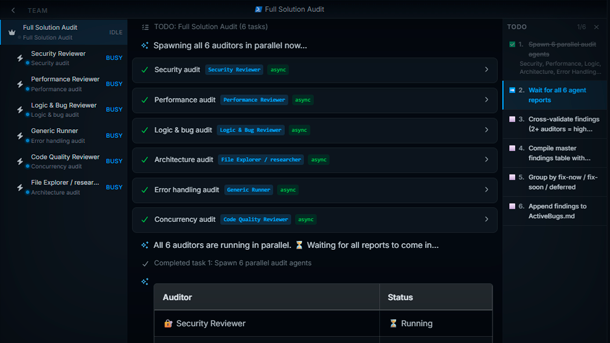
Multi-Agent Orchestration
Spawn parallel AI agents — a Backend Developer, a Frontend Developer, a Reviewer — all working simultaneously on different parts of your codebase. An orchestrator coordinates them, collects results, and integrates everything.
Live Code Intelligence
The AI uses LSP — go-to-definition, find references, rename symbols, live diagnostics — across 8+ languages. It understands your code, not just its text.
Economic Memory System
6-level compaction (L0–L6) with automatic economic promotion. Long sessions stay coherent without ballooning your API bill. Up to 200K token context.
You Stay in Control
Every file edit, shell command, and rename shows a diff and waits for your approval. The AI proposes. You decide. Nothing changes without your say-so.
Full Git Integration
Stage, commit, diff, stash, branch, push, pull, and resolve 3-way merge conflicts — all from inside the IDE. The AI can do it too.
Workflows & Automation
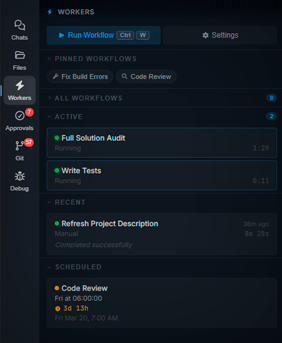
Create reusable prompt templates with scheduling, webhook triggers, and GitHub event integration. Automate code reviews, release notes, dependency updates, and anything else you can describe in plain English.
Integrated Debugger
Set breakpoints, inspect variables, step through code, view call stacks. Full DAP-based debugger built right in.
Voice Input & TTS
Hold a key to dictate prompts. Hear AI responses read back with karaoke-style word highlighting. Hands-free coding.
Cloud Tunnel
Access your local dev environment from any browser, anywhere. Secure WebSocket tunnel with session sharing and webhook forwarding.
MCP & Extensibility
Connect any external tool via Model Context Protocol. OAuth/PKCE auth for external servers. Package and share custom agents, skills, and workflows as portable bundles.
Real PTY Terminal
Not a fake shell. A full ConPTY/Unix PTY with stateful sessions, ANSI rendering, async background commands, and shell auto-detection.
What people build
with Eric
From solo developers to engineering teams — here’s what becomes possible when your AI can actually execute.
Full Feature Implementation
Describe a feature in plain English. Eric reads your codebase, writes the implementation across multiple files, runs tests, fixes failures, and commits — all autonomously.
Automated Code Reviews
Schedule a workflow to run on every PR. Eric reads the diff, checks for bugs, security issues, and style violations, then posts a structured review comment.
Database Migrations
Eric understands your schema, generates EF Core migrations, reviews them for correctness, applies them, and updates all affected queries — without you touching a line.
Test Generation at Scale
Point Eric at a service or module. It reads the code, generates comprehensive unit and integration tests, runs them, and iterates until they pass.
Legacy Code Modernization
Spawn multiple agents to tackle a large refactor in parallel. One agent handles the data layer, another the API, another the tests — all coordinated by an orchestrator.
CI/CD Pipeline Automation
Eric can write GitHub Actions workflows, Dockerfiles, and deployment scripts. Trigger it via webhook on every release to auto-generate changelogs and deployment notes.
Codebase Archaeology
Ask Eric to map an unfamiliar codebase. It reads files, traces dependencies, and produces a structured overview — onboarding in minutes instead of days.
Security Auditing
Schedule a nightly security scan. Eric reads your codebase, checks for injection vulnerabilities, exposed secrets, auth gaps, and files a structured report.
Teach Eric
your product.
Eric isn’t a generic AI. You shape it to know your codebase, your conventions, your team’s patterns — and it carries that knowledge into every session.
Skills
Reusable instruction sets injected into any agent’s context. Define your architecture, coding standards, deployment process — once. Eric follows them everywhere.
Always use repository pattern. Services go in /Core/Services. No async void.Custom Agents
Create specialized agents with their own model, temperature, capabilities, and directory access. A Backend Developer that only touches the API layer. A Reviewer that never writes code.
Security Reviewer — read-only, no shell, reviews for OWASP top 10Workflows
Parameterized prompt templates you can trigger manually, on a schedule, or via webhook. Run a full code review every morning. Auto-respond to GitHub issues. Ship on merge.
On PR open → run Security Reviewer → post summary as commentBundles
Package your agents, skills, MCP servers, and workflows into a portable bundle. Share with your team, publish to the community, or install from others in one click.
dotnet-team-bundle — C# agent + review workflow + architecture skillYour AI team.
Working in parallel.
Spawn specialized agents for different domains. They work simultaneously, report back, and you integrate. Like having a full engineering team on demand.
Backend and frontend work simultaneously. No waiting.
Each agent has its own model, capabilities, and directory permissions.
Agents don’t pollute each other’s context. Clean, focused work.
See every agent, their status, pending approvals, and active shells in real time.
Lightweight runners for research, builds, and reviews. Fire and forget or await results.
Works with any model
Switch models per agent, per task. Use the best model for each job.
Teach Eric.
Once. Forever.
Skills are reusable instruction sets injected into agent context at runtime. Teach Eric your coding standards, your architecture patterns, your team’s conventions — and every agent follows them automatically.
- Create skills from any conversation
- Apply skills per-pane or per-agent
- Share skills across your organization
- Package into portable bundles
- Combine with scheduled workflows
Always use repository pattern. Services must be injected via DI. No static classes...
Check for SQL injection, XSS, exposed secrets, missing auth guards...
Use xUnit. Arrange-Act-Assert pattern. Mock all external dependencies...
Join the community
Get help, share workflows, show off what you've built, and shape the future of EricBuild. Our Discord is where the real conversation happens.
Join DiscordThe AI that learns
how you build.
You don’t do the hard work — you tune the machine that does. Teach Eric your stack, your standards, your patterns. It adopts. It improves. It ships.